




需求分析:
nginx默认不支持四层转发和七层代理使用SSL证书,必须要开启下面的模块才可以
--with-stream
--with-stream_ssl_preread_module
--with-stream_ssl_module
操作步骤:
1、在编译安装nginx的时候加上这3个参数
#创建nginx安装目录
mkdir -p /data/server/nginx
mkdir -p /data/server/nginx/packages
mkdir -p /data/server/nginx/install
#安装nginx
#解压pcre
cd /data/server/nginx/packages
tar zxvf pcre2-10.47.tar.gz
#解压zlib
cd /data/server/nginx/packages
tar zxvf zlib-1.3.2.tar.gz
#解压openssl
cd /data/server/nginx/packages
tar zxvf openssl-3.6.1.tar.gz
#安装nginx
#nginx默认运行账号和组是Linux系统的内置账号和组nobody
#创建nginx运行账号和组
cd /data/server/nginx/packages
tar zxvf nginx-1.28.3.tar.gz
cd nginx-1.28.3
./configure \
--prefix=/data/server/nginx \
--user=autoops \
--group=autoops \
--without-http_memcached_module \
--with-http_stub_status_module \
--with-http_ssl_module \
--with-http_v2_module \
--with-http_gzip_static_module \
--with-http_realip_module \
--with-stream \
--with-stream_ssl_preread_module \
--with-stream_ssl_module \
--with-http_flv_module \
--with-http_mp4_module \
--with-http_sub_module \
--http-client-body-temp-path=/data/server/nginx/client \
--http-proxy-temp-path=/data/server/nginx/proxy \
--http-fastcgi-temp-path=/data/server/nginx/fcgi \
--http-uwsgi-temp-path=/data/server/nginx/uwsgi \
--with-openssl=/data/server/nginx/packages/openssl-3.6.1 \
--with-zlib=/data/server/nginx/packages/zlib-1.3.2 \
--with-pcre=/data/server/nginx/packages/pcre2-10.47
make -j$(nproc)
make install
#查看nginx版本和安装模块信息
/data/server/nginx/sbin/nginx -V
2、创建SSL自签证书
2.1创建https证书
确保机器上安装了openssl和openssl-devel
yum install openssl openssl-devel
#创建证书存放目录
mkdir -p /data/server/nginx/conf/cert/
#创建服务器私钥
cd /data/server/nginx/conf/cert/
openssl genpkey -algorithm RSA -out server.key
2.2编写 SAN 配置文件
cd /data/server/nginx/conf/cert/
vi san.conf
[req]
default_bits = 2048
prompt = no
distinguished_name = dn
req_extensions = v3_req
[dn]
C = CN
ST = Beijing
L = Beijing
O = MyCompany
OU = IT
CN = 10.104.253.8
emailAddress = admin@example.com
[v3_req]
basicConstraints = CA:FALSE
keyUsage = nonRepudiation, digitalSignature, keyEncipherment
subjectAltName = @alt_names
[alt_names]
IP.1 = 10.104.253.8 #服务器ip地址
IP.2 = 10.104.253.9 #可以写多个IP地址
IP.3 = 10.104.253.10
IP.4 = 10.104.253.11
IP.5 = 10.104.253.12
IP.6 = 10.148.195.150
IP.7 = 10.148.195.157
IP.8 = 10.148.195.154
IP.9 = 10.148.195.149
IP.10 = 10.148.195.156
# DNS.1 = your.domain.com # 如果有域名也加上
:wq! #保存退出
2.3使用该配置生成 CSR(证书签名请求)
openssl req -new -key server.key -out server.csr -config san.conf
2.4用私钥自签名生成最终证书
openssl x509 -req -days 3650 -in server.csr -signkey server.key -out server.crt -extfile san.conf -extensions v3_req
2.5验证生成的证书是否包含 SAN
openssl x509 -in server.crt -text -noout | grep -A5 "Subject Alternative Name"
2.6配置nginx服务器使用私有证书
我们用到有2个文件,私有证书server.crt和私钥server.key
3、配置SSL证书
3.1配置七层代理支持SSL证书
server {
# 监听 8443 端口,开启 SSL 和 HTTP/2
listen 8443 ssl;
http2 on;
server_name _;
# --- SSL 证书配置 (已填入你的路径) ---
ssl_certificate /data/server/nginx/conf/cert/server.crt;
ssl_certificate_key /data/server/nginx/conf/cert/server.key;
# --- SSL 安全加固配置 ---
# 推荐只使用 TLSv1.2 和 TLSv1.3
ssl_protocols TLSv1.2 TLSv1.3;
# 推荐加密套件
ssl_ciphers ECDHE-RSA-AES128-GCM-SHA256:ECDHE-RSA-AES256-GCM-SHA384:ECDHE-RSA-CHACHA20-POLY1305;
ssl_prefer_server_ciphers off;
# 会话缓存优化
ssl_session_cache shared:SSL:10m;
ssl_session_timeout 10m;
######其它配置信息######
{
3.2配置四层转发支持SSL证书
#添加stream模块到nginx主配置文件
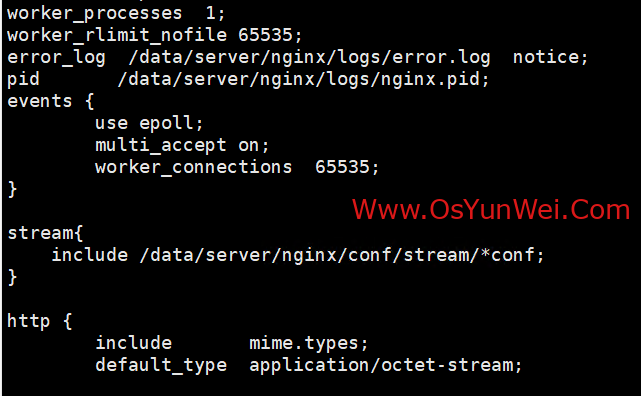
mkdir -p /data/server/nginx/conf/stream
vi /data/server/nginx/conf/nginx.conf
stream{
include /data/server/nginx/conf/stream/*conf;
}
:wq! #保存退出
upstream 9001_servers {
# 定义后端服务器组
server 192.168.144.196:9001;
server 192.168.144.197:9001;
}
server {
# 1. 监听 9001 端口,开启 SSL
listen 9001 ssl;
# 2. 配置 SSL 证书 (使用你之前的证书路径)
ssl_certificate /data/server/nginx/conf/cert/server.crt;
ssl_certificate_key /data/server/nginx/conf/cert/server.key;
# SSL 会话设置 (可选,提升性能)
ssl_session_cache shared:MINIO_SSL:10m;
ssl_session_timeout 10m;
# 设置与后端服务器建立连接的超时时间
proxy_connect_timeout 100s;
# 设置从后端服务器接收响应的超时时间
proxy_timeout 300s;
# 3. 代理到后端的 HTTP 端口 (6901)
proxy_pass 9001_servers;
}
至此,配置Nginx 四层(TCP/UDP)流量转发与七层(HTTP/HTTPS)代理支持SSL证书完成。

 ②190706903 ③203744115