




操作系统:Rocky Linux 10.x
Rocky Linux 10.x系统安装配置图解教程
https://www.osyunwei.com/archives/15874.html
安装包下载:
1、nginx
https://nginx.org/download/nginx-1.28.1.tar.gz
2、zlib
https://www.zlib.net/zlib-1.3.1.tar.gz
3、pcre2
https://github.com/PCRE2Project/pcre2/releases/download/pcre2-10.47/pcre2-10.47.tar.gz
4、openssl
https://github.com/openssl/openssl/releases/download/openssl-3.5.4/openssl-3.5.4.tar.gz
安装前准备:
1、防火墙配置
Rocky Linux默认使用的是firewall作为防火墙
firewall-cmd --list-all #显示所有规则(含服务、端口、区域)
systemctl status firewalld #检查 firewalld 状态
#开放80 443 端口
firewall-cmd --permanent --add-port=80/tcp
firewall-cmd --permanent --add-port=443/tcp
firewall-cmd --reload #重新加载防火墙配置
2、关闭SELINUX
vi /etc/selinux/config
#SELINUX=enforcing #注释掉
#SELINUXTYPE=targeted #注释掉
SELINUX=disabled #增加
:wq! #保存退出
setenforce 0 #使配置立即生效
getenforce #查看 SELinux 当前运行模式
3、创建nginx安装目录
mkdir -p /data/server/nginx
mkdir -p /data/server/nginx/packages
mkdir -p /data/server/nginx/install
上传安装包到/data/server/nginx/packages目录
编译安装nginx:
1、安装编译工具包
yum install tar make gcc gcc-c++ perl pcre2-devel zlib-devel glibc-devel
2、安装nginx
2.1解压pcre
cd /data/server/nginx/packages
tar zxvf pcre2-10.47.tar.gz
源码解压后路径是;/data/server/nginx/packages/pcre2-10.47
不需要安装
2.2解压zlib
cd /data/server/nginx/packages
tar zxvf zlib-1.3.1.tar.gz
源码解压后路径是;/data/server/nginx/packages/zlib-1.3.1
不需要安装
2.3解压openssl
cd /data/server/nginx/packages
tar zxvf openssl-3.5.4.tar.gz
源码解压后路径是;/data/server/nginx/packages/openssl-3.5.4
不需要安装
2.4安装nginx
#nginx默认运行账号和组是Linux系统的内置账号和组nobody
#创建nginx运行账号和组
groupadd www
useradd -g www www -s /sbin/nologin
cd /data/server/nginx/packages
tar zxvf nginx-1.28.1.tar.gz
cd nginx-1.28.1
./configure \
--prefix=/data/server/nginx \
--user=www \
--group=www \
--without-http_memcached_module \
--with-http_stub_status_module \
--with-http_ssl_module \
--with-http_v2_module \
--with-http_gzip_static_module \
--with-http_realip_module \
--with-stream \
--with-stream_ssl_preread_module \
--with-stream_ssl_module \
--with-http_flv_module \
--with-http_mp4_module \
--with-http_sub_module \
--http-client-body-temp-path=/data/server/nginx/client \
--http-proxy-temp-path=/data/server/nginx/proxy \
--http-fastcgi-temp-path=/data/server/nginx/fcgi \
--http-uwsgi-temp-path=/data/server/nginx/uwsgi \
--with-openssl=/data/server/nginx/packages/openssl-3.5.4 \
--with-zlib=/data/server/nginx/packages/zlib-1.3.1 \
--with-pcre=/data/server/nginx/packages/pcre2-10.47
注意:这个几个参数的路径指向的是源码包解压的路径,不是安装的路径。
--with-openssl=/data/server/nginx/packages/openssl-3.5.4
--with-zlib=/data/server/nginx/packages/zlib-1.3.1
--with-pcre=/data/server/nginx/packages/pcre2-10.47
make
make install
/data/server/nginx/sbin/nginx #启动Nginx
#查看nginx版本和安装模块信息
/data/server/nginx/sbin/nginx -V
2.5配置nginx启动脚本
vi /data/server/nginx/nginx.sh
#!/bin/bash
NGINX_PATH="/data/server/nginx/sbin/nginx"
PID_FILE="/data/server/nginx/logs/nginx.pid"
function start_nginx() {
if [ -f $PID_FILE ]; then
echo "Nginx is already running."
else
echo "Starting Nginx..."
$NGINX_PATH
echo "Nginx started."
fi
}
function stop_nginx() {
if [ -f $PID_FILE ]; then
echo "Stopping Nginx..."
$NGINX_PATH -s stop
echo "Nginx stopped."
else
echo "Nginx is not running."
fi
}
function restart_nginx() {
if [ -f $PID_FILE ]; then
echo "Restarting Nginx..."
$NGINX_PATH -s stop
sleep 1
$NGINX_PATH
echo "Nginx restarted."
else
echo "Nginx is not running. Starting it now..."
$NGINX_PATH
echo "Nginx started."
fi
}
function reload_nginx() {
if [ -f $PID_FILE ]; then
echo "Reloading Nginx configuration..."
$NGINX_PATH -s reload
echo "Nginx configuration reloaded."
else
echo "Nginx is not running. Cannot reload the configuration."
fi
}
function status_nginx() {
if [ -f $PID_FILE ]; then
echo "Nginx is running with PID $(cat $PID_FILE)."
else
echo "Nginx is stopped."
fi
}
case "$1" in
start)
start_nginx
;;
stop)
stop_nginx
;;
restart)
restart_nginx
;;
reload)
reload_nginx
;;
status)
status_nginx
;;
*)
echo "Usage: $0 {start|stop|restart|reload|status}"
exit 1
;;
esac
:wq! #保存退出
#添加执行权限
chmod +x /data/server/nginx/nginx.sh
#添加开机启动
vi /etc/rc.d/rc.local
/bin/sh /data/server/nginx/nginx.sh start
:wq! #保存退出
#默认/etc/rc.local没有执行权限,需要手动添加执行权限
chmod +x /etc/rc.d/rc.local
/bin/sh /data/server/nginx/nginx.sh restart
2.6使用systemd服务实现nginx开机启动
vi /lib/systemd/system/nginx.service #添加以下代码
[Unit]
Description=The NGINX HTTP and reverse proxy server
After=syslog.target network.target remote-fs.target nss-lookup.target
[Service]
Type=forking
PIDFile=/data/server/nginx/logs/nginx.pid
ExecStartPre=/data/server/nginx/sbin/nginx -t
ExecStart=/data/server/nginx/sbin/nginx
ExecReload=/data/server/nginx/sbin/nginx -s reload
ExecStop=/bin/kill -s QUIT $MAINPID
ExecStartPost=/bin/sleep 0.1
PrivateTmp=true
[Install]
WantedBy=multi-user.target
:wq! #保存退出
/data/server/nginx/sbin/nginx -s stop #停止
systemctl daemon-reload #重载 systemd 配置
systemctl enable nginx.service #设置开机自启动
systemctl start nginx.service #启动
systemctl stop nginx.service #关闭
systemctl restart nginx.service #重启
systemctl reload nginx.service #重新加载配置文件
2.7测试nginx
浏览器打开
http://192.168.21.159/
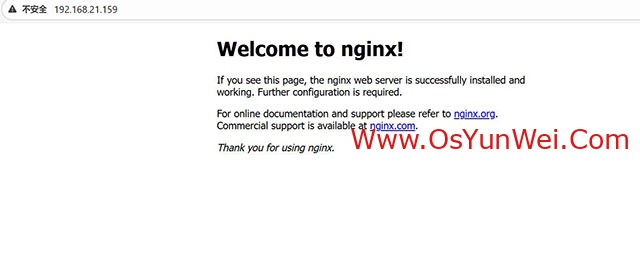
至此,Linux下编译安装nginx完成。

 ②190706903 ③203744115