




OpenWrt安装镜像有ext4和squashfs两种格式,ext4在安装完成后可以对磁盘进行扩容,squashfs则不能扩容。
但是,我们可以在安装前对squashfs镜像扩容操作,扩容完成之后再安装。
我们需要在Linux系统下操作,我这里用的是AnolisOS-8.10系统
1、下载OpenWRT的gz镜像上传后解压
镜像下载地址:
https://downloads.openwrt.org/releases/24.10.5/targets/x86/64/
https://downloads.openwrt.org/releases/24.10.5/targets/x86/64/openwrt-24.10.5-x86-64-generic-squashfs-combined.img.gz
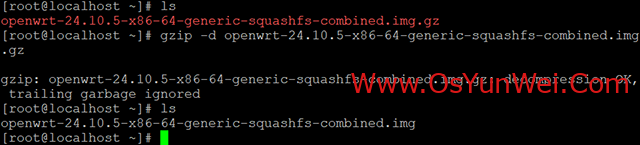
#解压
gzip -d openwrt-24.10.5-x86-64-generic-squashfs-combined.img.gz
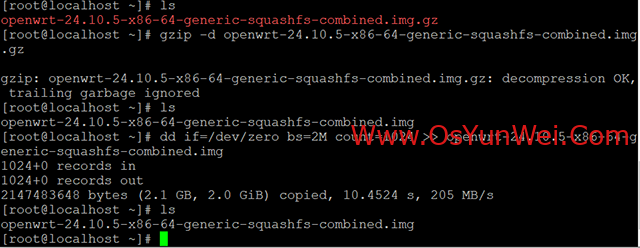
#扩容,镜像文件的末尾追加2GB的空白数据
#用dd命令,2M即一次,增加2M的空间,增加1024次,也就是2G的空间
dd if=/dev/zero bs=2M count=1024 >> openwrt-24.10.5-x86-64-generic-squashfs-combined.img
#用parted命令进入img镜像,把刚才增加的空间扩展进去
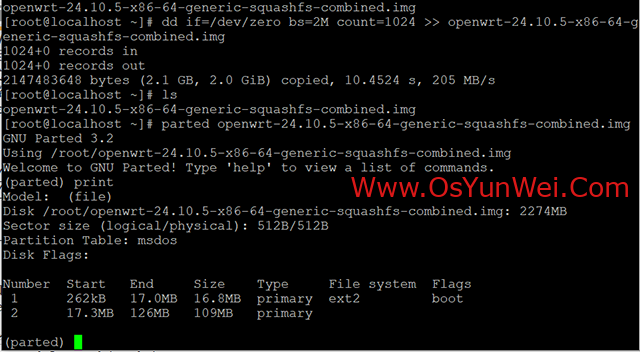
parted openwrt-24.10.5-x86-64-generic-squashfs-combined.img
print #用print查看一下分区,发现有两个区
Number Start End Size Type File system Flags
1 262kB 17.0MB 16.8MB primary ext2 boot
2 17.3MB 126MB 109MB primary
#把增加的空间扩容给第二个分区
resizepart 2 100%
#完成,退出
quit
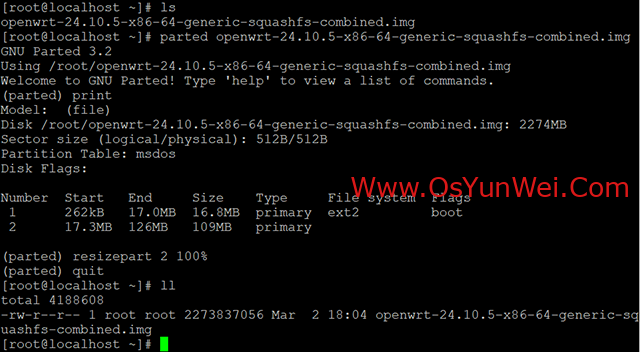
再次查看镜像分区大小,现在第二个分区已经显示是2GB了
现在就可以用这个镜像文件来安装了,装好之后磁盘空间就是2GB
至此,对OpenWrt的squashfs格式镜像进行扩容操作完成。

 ②190706903 ③203744115